The Scenario
Consider the following scenario:
- I am building a data platform on Microsoft Fabric, using Lakehouses as the primary storage engine.
- My end users need to consume data from the data platform as users of Power BI reports which connects to data from the Lakehouses, as developers of ad hoc models and report using data from the Lakehouses, and through ad hoc SQL queries on the Lakehouses.
- I want to use DirectLake for Power BI reports to take advantage of frequency data ingestion and transformation, and improve the actionability of my reports.
- My data is sensitive, and users, regardless of whether they consume reports or develop their own, need to be restricted by Row Level Security to only see some of the data.
Where should you grant users permissions and access in Fabric? Do you give them Workspace Access? Item Access? Something third entirely? The following are questions I hear people ask from time to time, which relate to one or more of the above bullets:
- How can users get access to build reports without seeing all the sensitive data?
- How can users get read access to both read data from Semantic Models / Power BI Reports AND Lakehouses, while still respecting row level security?
- Do I need to grant end-users access to the Lakehouse for my Semantic Models / Reports to work with DirectLake?
- Doesn’t DirectLake break when you apply Row Level Security?
- Will granting a user Workspace Permissions of any kind (even just Viewer) override RLS in semantic models?
I hear many people confused about the above and many other nuances…. At least I know I was! But I also spent a fair bit of time testing out different methods, and in this article, I want to share some very specific permission patterns that you can apply to solve certain scenarios.
Scenarios and Permission Structures
Scenario 1: Granting users access to consume Import Semantic Models / Power BI Reports built on Fabric Data Sources without RLS
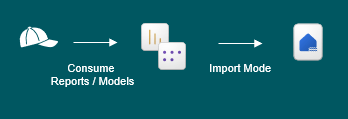
The first and most common permission scenario in Fabric, is to allow end users to consume Power BI Reports which are built on Import Semantic Models using Lakehouses and Warehouses as data sources without any sensitive data.
In scenarios like this where data is not sensitive, and you use Import Storage mode, this is as simple as creating a Report on top of a Semantic Model, and providing the user access to said report and/or model.
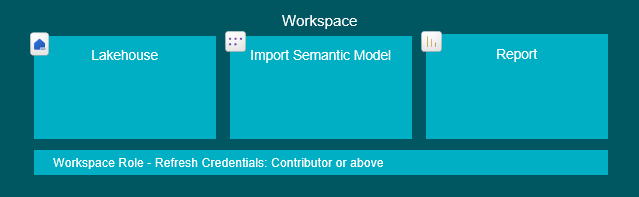
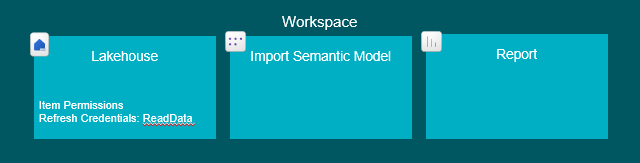
You will need to configure the underlying Import Semantic Model to use a set of credentials for the model refresh, and those credentials will need full access to the underlying Lakehouse/Warehouse/Data Source outside Fabric. This ensures that users do not need access to the source itself.
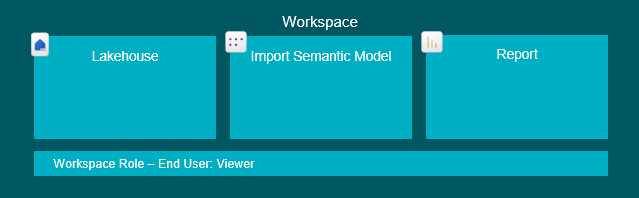
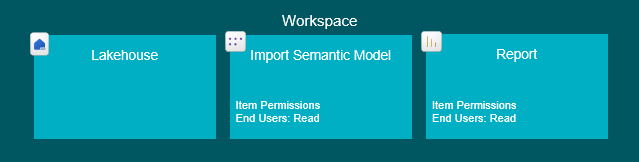
Model refreshes will import data to the model, and you can either add users as Viewers to the Workspace, add them to a Workspace App as viewers, or you can share the Model or Report directly with the end users with Read permissions, and they can use the data this way.
Why choose one over the other? There is a trade off here… Workspace Roles are to some extent more transparent and easier to configure, than setting individual Item Permissions. However this also means, that if anybody were to upload anything sensitive to a workspace where users have permissions to view everything… Well, that it obviously not great. This is also the reason why many organisations do not permit end users to receive any workspace roles.
Permissions to apply
End Users: Workspace Viewer role OR Workspace App access OR Read Access to the Report and Semantic Model Items

Credentials used for Semantic Model refresh: Workspace Contributor role or above OR Lakehouse ReadData item permission
2. Granting users access to consume Import Semantic Models / Power BI Reports with Security Restrictions
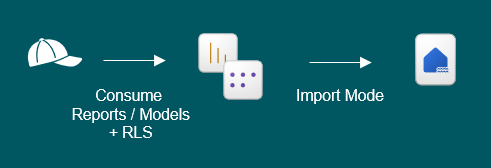
If some of your Lakehouse/Warehouse data needs to be restricted, and your models are configured for Import mode, you will need to add Row-Level Security (RLS) on your Semantic Model, restricting the end users to only seeing data that you specify.
This is an old topic, and works the same as was the case when you were working with just Power BI before Fabric. The topic has been elaborated on a bunch by much more intelligent people than myself, and I will recommend you to read some of the following resources:
Documentation: Row-level security (RLS) guidance in Power BI Desktop – Power BI | Microsoft Learn
Hardcoded RLS: Row Level Security in Power BI Desktop – RADACAD
Dynamic RLS: Implement Dynamic Row Level Security in Power BI
3. Granting users access to consume DirectLake Semantic Models / Power BI Reports without Security Applied
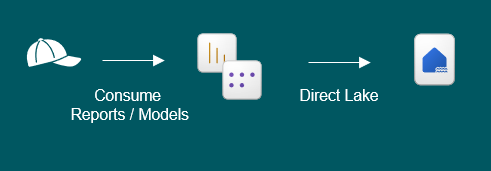
Things are a little more complex when you add DirectLake to the mix. Let’s first consider a scenario without RLS.
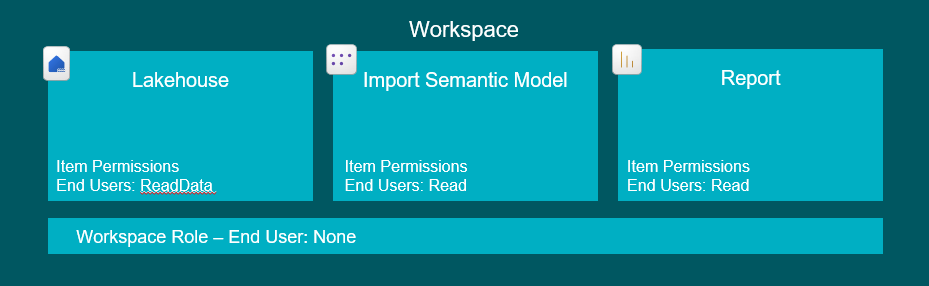
The semantic model will by default pass on the end-user credentials to the Lakehouse to authenticate, and therefore, you will need to share the Lakehouse with your end users, in order for DirectLake to work out of the box.
To do this, you will either need to give users Viewer permissions in your workspace (which will allow them to see everything in the workspace – and you most likely don’t want that), or you may grant the Item-level permissions “ReadData” allowing them to consume all data from the Lakehouse (both through the Direct Lake Semantic Model, or directly by querying the Lakehouse).
And then in addition you of course still need to share the Model and/or Report with your end users, the same was as described in the first scenario.
Permissions to apply
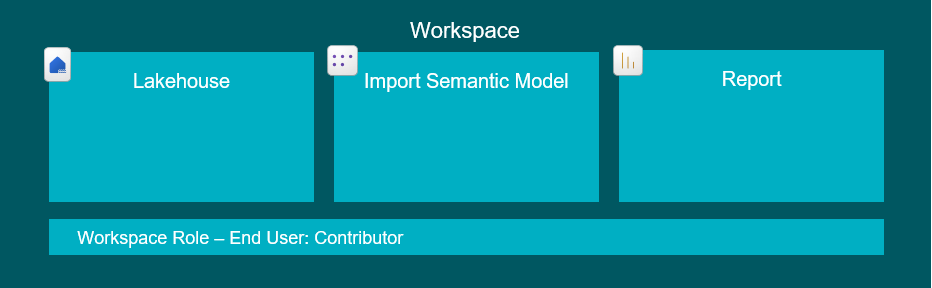
End Users: ReadData Item permission on the Lakehouse used for the Semantic Model OR Workspace Viewer role (… AND access to the Model/Report using the data, of course).
4. Granting users access to consume raw data from a Lakehouse in Fabric without Security Applied
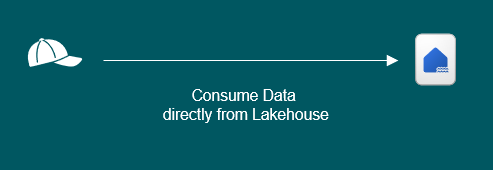
Luckily, this is exactly the same as the scenario above. When users have access to data in a Lakehouse, it doesn’t matter if they try to access via a model, report or going straight to the Lakehouse to test some delicious queries.
I just included this section to clear up any confusion, and to make it easier for you to find your answers :).
5. Granting users access to consume DirectLake Semantic Models / Power BI Reports with RLS
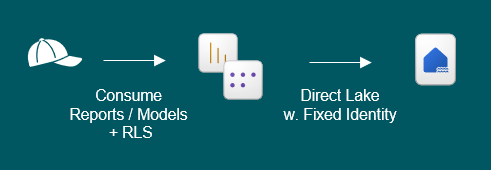
What if the data fecthed by the DirectLake connection in a semantic model needs to be filtered for security reasons?
Well, you could implement RLS directly on the SQL Endpoint of your Lakehouse with SQL granular permissions… Your reports would work, and RLS would be applied, BUT – your report would actually be running in DirectQuery mode, as all DirectLake connections fallback to DirectQuery when RLS is applied on the SQL endpoint. This is currently a hard limitation on DirectLake storage mode.
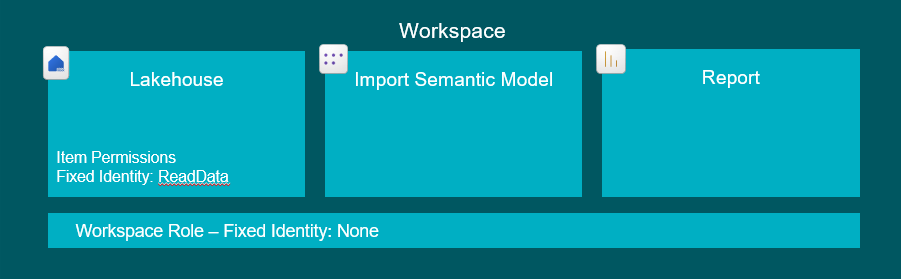
What you will rather want to do, is implement Row-Level Security in the Semantic Model, and configure the model to use a Fixed Identity to connect to the Lakehouse. For more details on setting up RLS for DirectLake models, see my blog here: How to setup RLS in Microsoft Fabric / Power BI without breaking DirectLake functionality – Downhill Data
Permissions to apply
End Users: Either Workspace Viewer role OR Workspace App access OR Read Access to the Report and Semantic Model Items (same as sharing a good ol’ import semantic model in scenario 1).
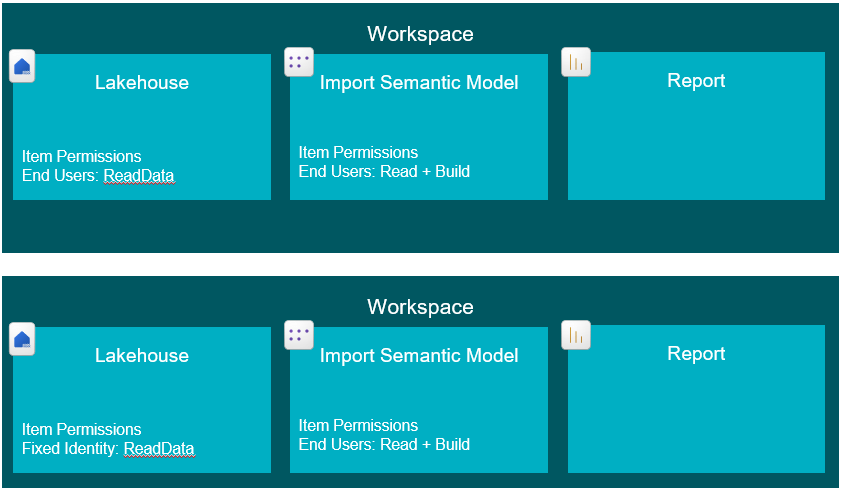
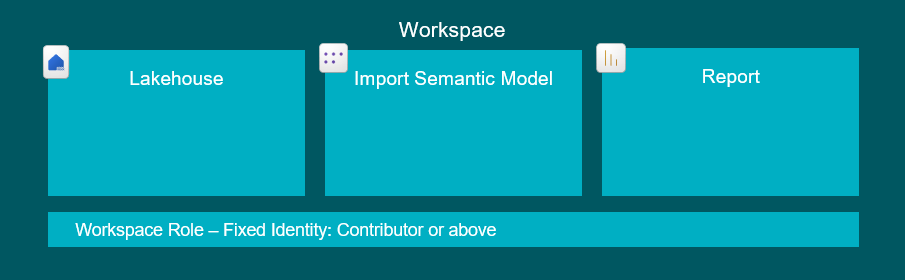
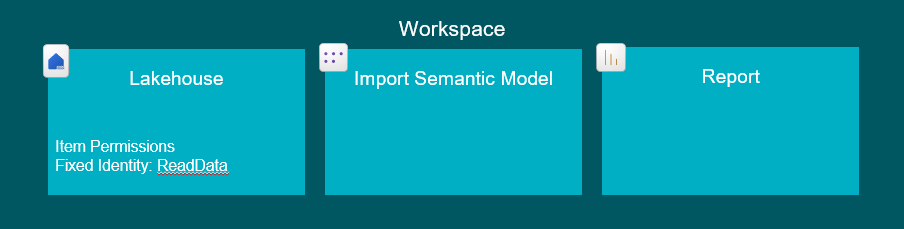
Fixed Identity: ReadData on Lakehouse OR Workspace Member/Contributor role.

6. Granting users access to consume data from only some tables in a Lakehouse, directly or through Reports/Semantic Models

Another security scenario is that rather than Row-Level Security, we wish to only grant users to certain tables in a lakehouse entirely. Regardless of whether they try to access directly through the SQL Endpoint, or through a DirectLake Semantic Model.
This is especially useful when you build large Data Platform Lakehouses which consolidate a multitude of data sources, but users are not allowed access to everything in there.
Effectively, this is Object Level Security (OLS), and in the case of Semantic Models, could be achieved through the use of e.g. tabular editor (Setup or Modify OLS | Tabular Editor Documentation).
However to avoid replicating the security rules every time we make a new semantic model, we can apply restrictions on the Lakehouse itself.
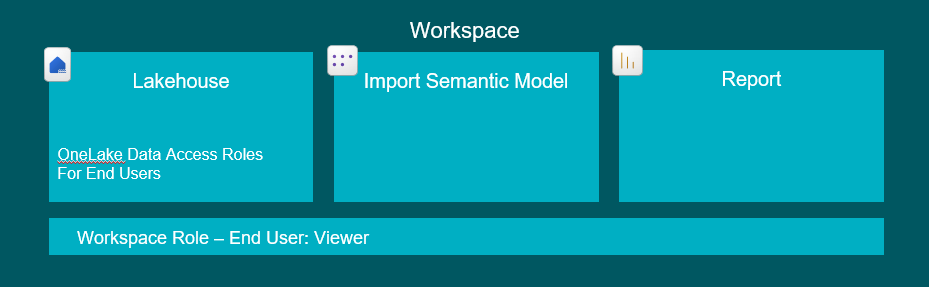
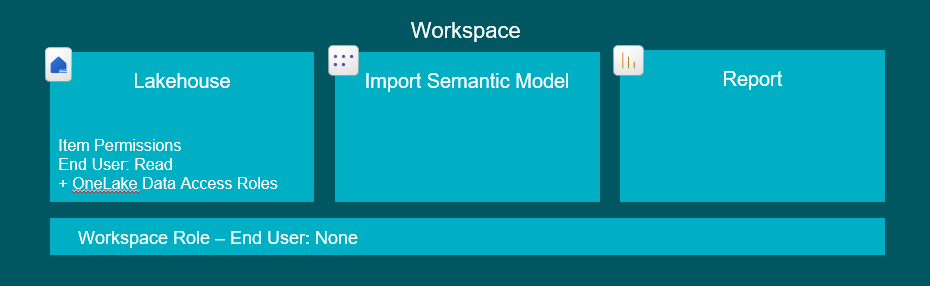
The best feature for the job currently are the OneLake Data Access Roles (Get started with OneLake data access roles (preview) – Microsoft Fabric | Microsoft Learn), which allow you to apply Role Based access to specific Folders and Tables in your Lakehouses. Combining these roles with regular Read access on a Lakehouse let’s you control what data the users can see.
The downside? The feature is still in Preview.
As a generally available alternative, you could of course apply RLS restrictions through SQL granular permissions on the Lakehouse SQL endpoint, and simply restrict a user from seeing any rows at all, effectively achieving the same result. But this would prevent DirectLake from working. Let’s hope Data Access Roles are soon out of preview!
Permissions to apply
End Users: Either Workspace Viewer role OR Read Access to the Lakehouse Item, AND add the users to one or more OneLake Data Access Roles.
7. Granting users access to build their own Reports/Semantic Models, on top of existing Semantic Models using DirectLake
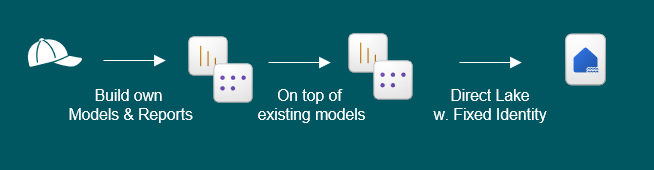
Sometimes we wish for data models to be reused, and end users to be able to build their own models and reports on top.
For this to work, you will first need to setup the end user permissions as they were in scenario 3, 5 or 6, depending on whether or not you need RLS or OLS applied as well.
Then, you will in addition need to grant Build permissions on the Semantic Model that is to be reused, for the users who need to extend the model and/or build reports on top.
Build permissions are granted as an Item-level permission on the Semantic Model, and does not allow the end-user to modify the original model, NOR does it allow them to bypass any RLS applied (contrary to popular belief – I hear this one a lot).
It only allows them to build their own Semantic Models, taking the original one as starting point, and extending it with e.g. new measures (which will save the model as a new Semantic Model artifact – it will not overwrite the existing), and to build reports using the published semantic model they were granted build permissions to.
Permissions to apply
End Users: Build Item Permissions on the Semantic Model that they want to use AND Lakehouse permissions according to Scenario 3 or 5, depending on whether RLS is applied or not.
8. Granting users access to directly query Lakehouses with respect for RLS, while the same data is simultaneously used for DirectLake Semantic Models with RLS using Fixed Identity
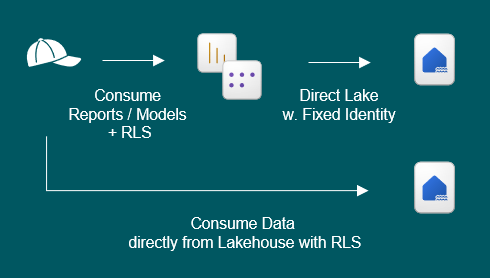
What a mouthful… This is the scenario which inspired this blog post…
If you have built a Lakehouse, and you use it for building DirectLake Semantic Models with Row Level Security, you have on purpose avoided putting any RLS directly on the SQL Endpoint, as this would void any benefits of DirectLake, like we already established (it would fallback to DirectQuery when interpreting the SQL RLS).
So… How would we then grant end users access to the Lakehouse and its data itself, without granting them access to the whole feast of sensitive data?
The solution is to create A SECOND LAKEHOUSE. This second Lakehouse, will have all the tables from the first Lakehouse. BUT – we will implement RLS on the SQL Endpoint this time. using SQL granular permissions.
This second lakehouse will be possible to share with End Users using the regular “Read” permission on the Lakehouse Item. This will not violate security rules, as the regular Read permission respects all SQL RLS permissions defined in the SQL Endpoint.
Our end users can now connect to and read only the data they are allowed from the Lakehouse. They can create SQL queries directly against the Lakehouse, or they can create DirectQuery and/or Import Semantic Models using this secondary lakehouse.
Can they create their own DirectLake models from scratch? Well, yes, but actually no. They can technically create it, but all the queries will fall back to DirectQuery due to the RLS. That is the limitation of this technique. They can however still extend the Semantic Models built by others on top of Lakehouse 1, or create reports based off of it.
Permissions to apply
End Users Option 1: Workspace Viewer Role AND SQL Granular Permissions on Lakehouse 2
(Yes, that is actually enough. The Viewer role will give “Read” access to both Lakehouses, but on Lakehouse 1, this will not allow them to see any data, as no OneLake Data Access Roles nor SQL Granular Permissions have been defined).
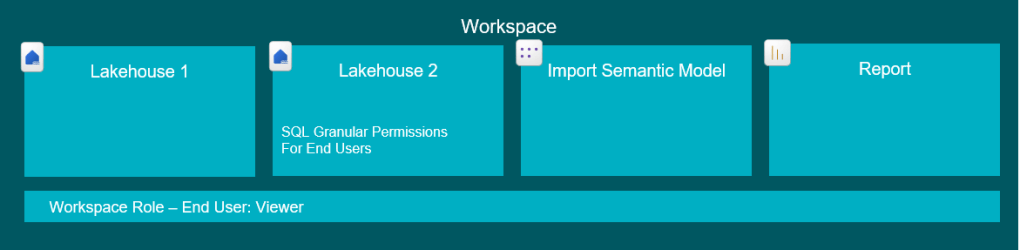
End Users Option 2: Workspace App access OR Read Access to the Report and Semantic Model Items connected to Lakehouse 1 AND Read Access to Lakehouse 2 AND SQL Granular Permissions on Lakehouse 2


Fixed Identity: ReadData on Lakehouse 1 OR Workspace Contributor role or above.
Conclusion
Fabric permissions are a complex topic, and the breadth of possibilities are not making things easier. I hope the above granted you a decent overview of solutions to some of the most common scenarios.
And then here’s to hoping that these things will simplify in the future..


 Downhill Data
Leave a comment