Introduction
If you’ve been following this blog, you know that Fabric Governance and Administration is a topic I care deeply about.
Previously we’ve covered Domains and Workspaces as constructs you can leverage for organizing your platform. Today, we handle the next level of detail: Workspace Folders.
Every time I see a new Fabric Data Platform, I see a new way of using folders. Almost.
Ranging from no folders at all, to using folders to segregate item types, over folders for bronze/silver/gold layers, to even seeing setups of them being used for DEV/TEST/PROD.
I won’t claim all of these to be equally good. But the point is that there are many different approaches you may take.
In this blog I’ll cover some of these different strategies for Workspace Folders, and highlight a few caveats to be aware of.
What are Workspace Folders, and how well do they work today?
Workspace Folders are a way of organizing the content of your Microsoft Fabric Workspaces. That’s it. Nothing more.
Contrary to Workspaces themselves (which I like to call the equivalent of Folders in Teams/Sharepoint) which also act as a broker of accesses and permissions, Folders allow nothing of the sort.
If you have access to a Workspace, you have the same permissions inside every single folder as the permissions you have in the root of the Workspace.
Workspace Folders as a feature in the Power BI service had been requested for years, but it wasn’t until Microsoft Fabric came about that we finally got the feature, with general availability launching in December 2024.
Being generally available, we’d also expect this feature to work seamlessly. Right?
Actually, I think they work pretty well now. But it is safe to say that the history of Workspace Folders have been quite messy, with heaps of bugs and missing integrations. We are at the time of writing however at a point where most of the worst issues seem to have been solved. Below is a status on some of the issues we’ve seen in the past, as far as I am aware:
- GIT support for Workspace Folders was missing for the longest time. We did eventually get GIT support for folders in the beginning of 2025, but especially in the beginning, users were complaining about a multitude of issues. I do no longer experience these issues:
- Items would occasionally be thrown out of folders back into the root of the workspace, either during regular commits, or during branch out operations.
- This would consequently lead to sync issues between GIT and and the workspace suggesting that there were pending updates when there shouldn’t be.
- Attempting to undo changes to revert back to the original setup was seen to once in a while delete items from the workspace.
- Deployment Pipeline support for Folders in only in Preview, although it seems to work pretty well, keep this in mind.
- Folders have also only recently started supporting Dataflows Gen2 – but a lot of people haven’t noticed this!
- We are finally able to bulk move items in/out of folders
- We are finally able to publish directly into folders from Power BI desktop
Strategies for Workspace Folders
It is time to unfold some of the different paradigms of using Workspace Folders that I’ve seen out in the world. We’ll start by what I would say are the most common approaches, and end with some of the more exotic ones.
I’ll try to comment on viability, but truth be told, I firmly believe your choice should depend strongly on your organisation, the people who are using the platform and the choices you’ve already made on Domains and Workspaces.
Workspace Folders as containers of Platform Layers (e.g. Bronze/Silver/Gold)
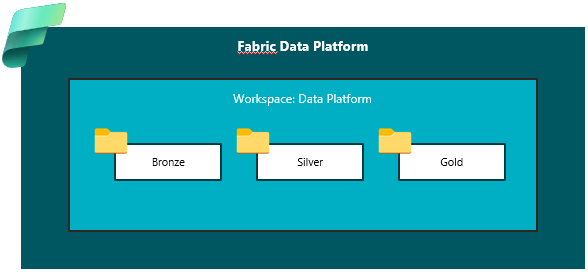
Perhaps the most common setup I see, is having a single workspace with folders for each layer of transformation applied.
Obviously, this is usually seen in workspaces which handles backend artifacts on the platform, and goes hand in hand with a monolithic workspace strategy in which e.g. all platform layers related to a data source is consolidated in a single workspace, and items related to bronze, silver and gold ends up in one workspace.
In this case, a workspace might contain folders for Bronze, Silver and Gold, or for other similar setups, perhaps for Raw, Base and Enriched.
This is a viable strategy if you don’t have any requirements for separating Workspace Accesses on these layers, and are fine with developers of the Bronze Layer having the same rights on the Gold Layer, and Viewers of the Gold Layer equally being allowed to read straight from Bronze.
For CI/CD purposes, the setup is simple, as it has very few workspaces involved in the process.
And perhaps the biggest perk of them all, is being able to group together all items which interact with each other, as this is a dimension that is otherwise impossible to filter by.
Workspace Folders as containers of item categories

The second most frequent setup I see (surprisingly, I think), is some sort of organizing fabric items into buckets/categories tied to what role they play in Workspace. Sometimes these are even tied to the Workspace Task Flow tasks (i.e. a folder for Orchestration, a folder for Storage, a folder for Reporting).
Other times it is just folders mirroring the item categories of Fabric (i.e. Data Factory, Data Engineering, Power BI).
I find that this works reasonably well, as it grants teams of developers the possibility of grouping together similar items. But on the other hand, these folders will rarely tell the developers anything about the relation between the items.
Then you would use the Lineage view of the workspace perhaps. But then why did you need the folders in the first place?
Workspace Folders as containers of item types
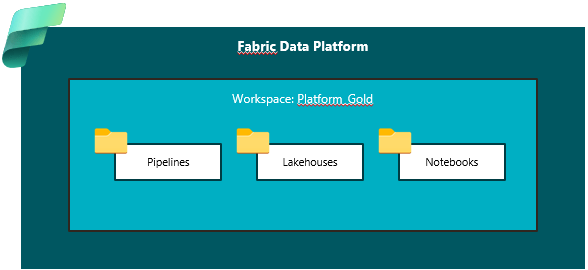
I have also seen the previous strategy taken to the extreme, where each individual Item Type had its own Folder.
Still not pretty, and honestly serves no real purpose in my opinion, as you could just use the Workspace Filtering options to achieve the same result.
Remember the mantra: Folders don’t give you any security!
Workspace Folders as containers of ‘topics/solutions’

This construct is most commonly found in organizations who subscribe to the idea of “Source-aligned”/Organizationally owned domains and workspaces, as described in my blog on Domain strategies: Organizing your Microsoft Fabric Data Platform: Domains – Downhill Data
The idea is, that if your Workspaces reflect departments or entities more or less straight from your organizational chart, chances are that they will contain a multitude of data products and fabric items related to very different topics or solutions.
A Finance Workspace might contain folders related to Budgets but also Actual results.
A Sales Workspace might contain folders related to Customer Management and to Sales Performance. You get the picture.
My take on this setup is, that there is a delicate balance for when to use Folders vs. when to simply split up into another related Workspace. Consolidating too many items in a single workspace may lead to compromises during CI/CD processes, while too many workspaces may give too much overhead on managing permissions.
Workspace Folders as containers of ‘roles/departments’
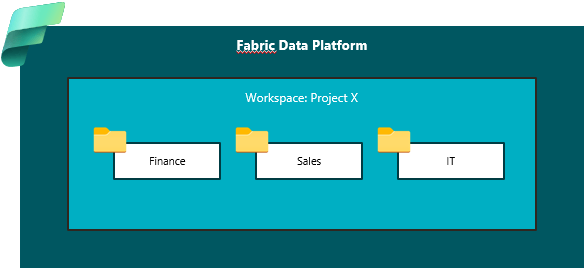
Contrarily, if an organization subscribes to “Consumer-aligned”/Business Owned Domains, in which Workspaces are focused on Projects or Value Streams, which are often cross-functional both in terms of the teams and roles involved, I sometimes see Folders used to separate items being used by/developed by the different participants.
A project workspace might contain folders related to Data Scientists and Data Engineers working alongside on a technical implementation.
A project workspace might contain folders related to Finance and Sales employees collaborating on an operational solution.
My take on this setup is that you need to be careful not to falsely assume any kind of security granted by the Folders. Remember that anybody with permissions on the workspace, can go do the same stuff in any folder.
Workspace Folders as deployment stages (e.g. Dev/Test/Prod)
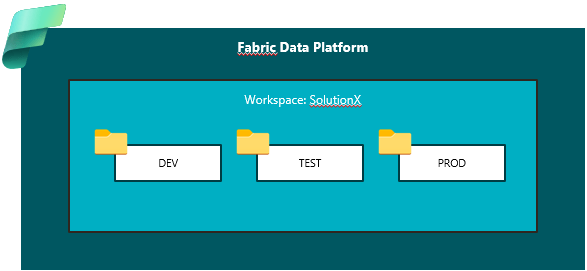
Only once have I seen this setup, where a single workspace served as both DEV, TEST and PROD stages of deployment.
Deployments were in this case done manually, and came with a lot of silly workarounds.
As workspaces can never contain two items of the same type with the exact same name, not even when stored in separate folders, the users were manually also naming their items by the stage they belonged to.
But what value did the Folders then really carry? Could they maybe have done with just a good Naming Convention?
My take: I would never recommend this.
Conclusion
Workspace Folders have come a long way in terms of becoming a more attractive construct of organization in your workspaces.
There is no one size fits all when it comes to choosing a Folder Strategy, and I would recommend having a look at your chosen path for Domains and Workspaces, to inform your decision on Folder Strategy.
Personally, I would usually recommend splitting up monolithic workspaces with folders for each platform layer. If you are already splitting up at the workspace level, I often find my self drifting towards using folders for Categories of items.
But that’s just my personal preference.



 Downhill Data
Leave a reply to Using Workspace Folders in Microsoft Fabric – Curated SQL Cancel reply